Pass-through hatch for AI prompts
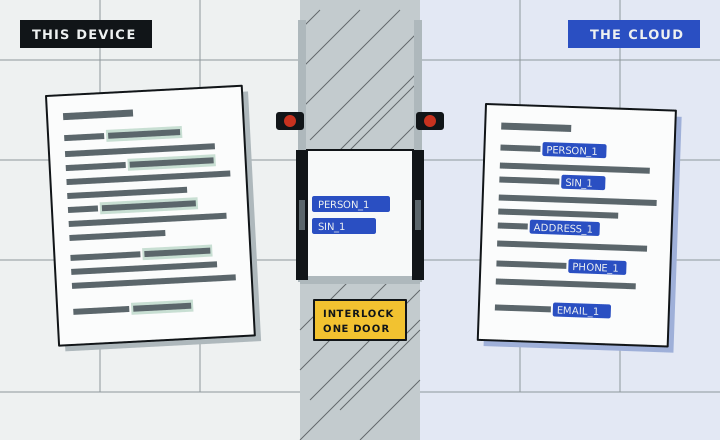
Your document stays here. Only tokens go through.
Gemini Nano reads the document on this device and swaps every name, number and address for a token. Cloud Gemini works with the tokens. The answer comes back and is filled in here, and the log shows exactly what left.
Device room
Nothing in this room leaves your browser.
Document
Review what will be hidden
Tap a highlight to let it through or hide it again. Select any text to hide it too.
Hatch
Cloud room
What Gemini in the cloud receives. Exactly this, nothing more.
The tokenized copy appears here after the scan.
Custody split
Stays on this device
| Token | Real value | Found by |
|---|
Goes to the cloud
Answer
in_cloud As it came back
on_device Filled in on this device
What left this device
Every run is written here, in this browser only. Cloud runs keep the exact text that was sent.
How the hatch works
- 01
Find, on the device
Checksum-verified patterns catch SINs, cards, health numbers and IBANs. Gemini Nano, through Firebase AI Logic in
ONLY_ON_DEVICEmode with a JSON schema, finds names, organizations and addresses. If Nano is missing, the patterns still run and the cloud never stands in for it. - 02
Swap for tokens
Each value gets a stable token like
[[PERSON_1]]. The table of real values lives in this tab’s memory and is gone on reload. - 03
Check before the door opens
The guard re-scans the outgoing text for every real value and every pattern. One hit keeps the cloud door shut.
- 04
Ask the cloud with tokens
Firebase AI Logic in
ONLY_IN_CLOUDmode sends the tokenized text to Gemini. Each answer shows itsinferenceSource. - 05
Fill in, on the device
Tokens in the answer are replaced with the real values here. Tokens the model made up are flagged, and the run goes to the log.
Built on RedactGate, our earlier server-side redaction gateway. This version is new: the detection runs in the browser with Gemini Nano, and the cloud step goes through Firebase AI Logic.